
HR administrative staff spend over 40% of their time reconfiguring systems, resolving integration issues, and producing reports—work that rarely shows up in a strategic business conversation.
HR integration is the solution to that problem. Done well, it transforms a disconnected collection of HR tools into a connected ecosystem where data flows automatically, errors drop, and HR teams get time back for the work that actually moves the business forward.
This article covers the definition, the three types of integration, key use cases, business benefits, and how to make smart integration decisions for your organization.
Key Takeaways
- HR integration connects your HR systems so employee data flows automatically between them—no manual re-entry required.
- Native, custom API, and iPaaS are the three integration types—each with different complexity and resource requirements.
- Payroll is the highest-priority integration for most organizations, with measurable error and cost implications when it's missing.
- Connected HR data enables more strategic decisions around compensation, performance, and workforce planning.
- Successful integration starts with auditing your pain points, not chasing the flashiest platform.
What Is HR Integration?
HR integration is the connection between an HR system—typically an HRIS—and other business software applications that allows data to flow automatically between them without manual re-entry. The goal is simple: make your systems talk to each other.
When an employee record is created or updated in one system, that change automatically syncs to every connected system, triggering relevant workflows or updating corresponding records. A practical example: a candidate marked as "hired" in your applicant tracking system (ATS) automatically creates a record in payroll, populates onboarding tasks, and triggers a benefits enrollment notification. No one copies and pastes data between platforms.
Integrated HR Systems vs. Standalone HR Software
A standalone HR tool operates in isolation. Each system holds its own version of employee data, and someone on the HR team has to manually enter updates into each one whenever anything changes.
An integrated HR ecosystem is different. Systems are interconnected, and data moves between them automatically. New hire information entered once in your HRIS populates payroll, benefits, and your LMS without additional effort.
One distinction that trips up a lot of HR teams: an HRIS and HR integration are not the same thing.
| Term | What it does |
|---|---|
| HRIS | Stores and manages employee data |
| HR Integration | Connects the HRIS (and other systems) so data flows between them automatically |
Vendors often blur this line in their marketing. Knowing the difference helps you ask the right questions before committing to a platform—and avoid discovering the gap only after implementation.
The Three Types of HR Integrations
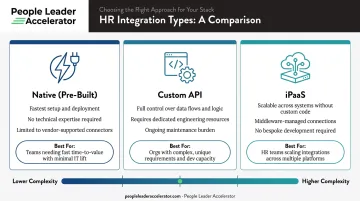
Not all integrations are built the same way. The right approach depends on your technical resources, the flexibility you need, and how many systems you're connecting.
Native (Pre-Built) Integrations
Native integrations are pre-built connectors offered directly by HR software vendors. They're the fastest to set up and require no technical expertise — a practical fit for HR teams without dedicated IT support.
The limitation is scope: you're locked into what the vendor has already built. If your vendor doesn't support a connector for a specific tool, you're out of luck—or you need to look at another approach.
Best for: Smaller teams, standard workflows, speed of implementation.
Custom API Integrations
A custom API integration is built directly against each system's application programming interface (API), giving you complete control over data flows, field mapping, and timing.
That control comes at a cost: custom integrations require engineering resources to build and ongoing maintenance to sustain. APIs change. SAP's own documentation explicitly notes that deprecated APIs "may be decommissioned later"—meaning custom integrations need active lifecycle monitoring.
Best for: Larger organizations with dedicated technical resources and non-standard data requirements.
iPaaS (Integration Platform as a Service)
iPaaS platforms—such as Boomi or MuleSoft—sit between your systems and handle data mapping, transformation, and syncing without requiring custom development. More scalable than native integrations and less engineering-intensive than custom APIs, they offer meaningful flexibility without the maintenance burden.
Best for: Organizations connecting multiple HR applications across functions, or those that need orchestration without building it from scratch.
Key HR Integration Use Cases Every HR Leader Should Know
Payroll Integration
Payroll is the most impactful integration most organizations can make—and one of the most underimplemented. ADP's global payroll survey found that only 45% of organizations had integrated their HR systems with payroll, despite IT teams spending an average of 25 hours per country per week managing payroll data flows manually.
The accuracy stakes are real. ADP's reported average payroll accuracy is 85%—with data inaccuracies cited as a leading cause of errors by 37% of respondents. An EY study found the average payroll error costs $291, and a 1,000-person organization spends roughly 29 workweeks annually correcting them.
Connecting your HRIS to payroll automates the flow of new hire data, compensation changes, and terminations—eliminating manual entry and its associated errors.
ATS to Onboarding Integration
When an ATS is connected to onboarding tools, the moment a candidate is marked as hired, their profile automatically populates onboarding workflows, task lists, and document requests. No duplicate data entry, no delay between offer acceptance and Day 1 readiness.
SAP SuccessFactors documents exactly this flow: candidate information collected during recruiting passes directly into onboarding, closing the handoff gap before it becomes a bottleneck.
Benefits Administration Integration
Integrating your benefits platform with the HRIS automates:
- Employee enrollment triggered by new hire records
- Eligibility updates when employment status changes
- Life event adjustments (marriage, dependent additions)
- Off-boarding benefit terminations
Without this integration, benefits changes depend on manual coordination between HR and the benefits provider—an error-prone process that creates both compliance risk and employee frustration.
LMS Integration
Connecting a learning management system to the HRIS enables role-based and department-specific training to be automatically assigned based on employee data. When someone changes roles, their learning curriculum updates accordingly. Completion records sync back to the HRIS, creating a single source of truth for development history.
Performance Management and People Analytics Integration
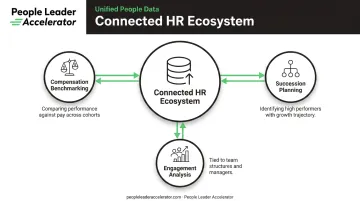
When performance tools connect to the HRIS, HR leaders gain a unified view that links role, tenure, compensation, and performance data — moving integration from a data plumbing exercise into a strategic asset.
That connected view enables:
- More accurate compensation benchmarking (comparing performance against pay across cohorts)
- Stronger succession planning (identifying high performers with growth trajectory)
- Engagement analysis tied to specific team structures or managers
Organizations that connect HR systems strategy to business strategy are twice as likely to inform business decisions with HR data, according to Sapient Insights. Building that capability requires both integrated data and the analytical frameworks to act on it. People Leader Accelerator's people analytics and strategic HR leadership curriculum is designed to help HR leaders develop exactly that — translating connected systems into decisions that move the business forward.
The Business Benefits of HR Integration
Eliminates Manual Entry and Reduces Errors
When data entered once in a source system propagates automatically to connected systems, the risk of inconsistencies drops across the board. This matters most in payroll—where errors carry direct financial and trust consequences—but applies equally to benefits eligibility, onboarding completion, and performance records.
Frees HR Teams for Strategic Work
Every hour spent re-entering new hire data, reconciling employee records, or manually syncing terminations is an hour not spent on workforce planning, organizational design, or culture. Integration recovers that time at scale.
HR leaders who want to use that recovered capacity strategically often find that having integrated data is only half the equation. Building the skills to act on that data—through people analytics competencies, strategic planning frameworks, and peer learning—is what turns integration into real organizational impact. People Leader Accelerator equips HR professionals with exactly those frameworks, connecting workforce data to business decisions that leadership teams actually act on.
Improves the Employee Experience
Integration removes friction at every touchpoint employees interact with HR systems:
- Faster, less paperwork-heavy onboarding
- More accurate and on-time payroll
- Seamless benefits enrollment
- Automatically assigned learning relevant to their role
Employees rarely notice when systems work well together—but they definitely notice when they don't.
Enables Data-Driven HR Decision-Making
A connected HR ecosystem creates a unified view of workforce data that siloed systems simply can't provide. HR leaders gain the ability to spot patterns, measure program effectiveness, and bring evidence-based recommendations to leadership conversations. That shift—from reporting on headcount to advising on organizational strategy—is where HR integration delivers its highest-value return.
How to Choose the Right HR Integrations
Start With Pain Points, Not a Wish List
Audit your current workflows first. Where does the team spend the most time on manual data entry? Where do errors surface most frequently? Where do delays in one system create downstream problems in another?
Prioritize integrations that solve the highest-impact problems before trying to connect everything at once. For most organizations, payroll is the right place to start.
Evaluate Compatibility With Your Tech Stack
Before committing to any integration approach:
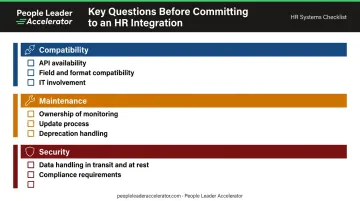
- Confirm each system has available, well-documented APIs or native connectors
- Verify that data formats and field structures are compatible
- Involve IT or a technical stakeholder early—before vendor contracts are signed, not after
Consider Maintenance, Not Just Implementation
Integration is not a one-time project. APIs change, vendors release updates, and organizations add new tools over time. Ask vendors directly:
- Who owns monitoring and maintenance when something breaks?
- How is employee data handled in transit and at rest?
- What is the process when a connected system releases a major update?
That last question matters more than most teams realize. According to ADP research, 93% of payroll respondents rated data security as very or critically important to their payroll strategy — treat integration security with the same rigor as any other compliance requirement.
Common HR Integration Challenges
Data Quality and Standardization
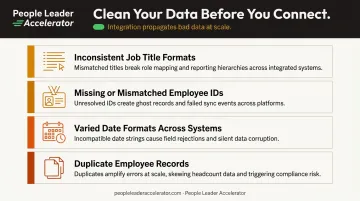
An integration is only as good as the data going into it. If employee records in the source system are incomplete, use inconsistent field naming, or contain duplicates, the integration will propagate those errors at scale across every connected system.
Clean and standardize data before connecting systems—not after. Common issues to address:
- Inconsistent job title formats
- Missing or mismatched employee IDs
- Varied date formats across systems
- Duplicate employee records
Post-Integration Maintenance
Some HRIS providers limit API access or require formal partnership agreements before integrations can be built. This creates friction before a single line of code is written—factor vendor access requirements into your evaluation early.
Beyond setup, integrations require ongoing attention. Factor long-term maintenance costs into your evaluation alongside the initial build. Ongoing responsibilities typically include:
- Monitoring data sync errors and failed transfers
- Retesting connections when either system releases updates
- Managing vendor API changes or deprecations
- Keeping field mappings current as your org structure evolves
Frequently Asked Questions
What are HR integrations?
HR integrations are connections between an HR system (such as an HRIS) and other business software that allow employee data to flow automatically between platforms. They eliminate manual re-entry, keeping employee data consistent across every platform in your tech stack.
What are the three types of HR integrations?
The three types are native (pre-built connectors), custom API (organization-built connections), and iPaaS (middleware platform-managed flows). Each varies in technical complexity and flexibility — native integrations are fastest to deploy, while custom API builds offer the most control.
What is the difference between an HRIS and HR integration?
An HRIS is the system that stores and manages employee data. HR integration is the process of connecting that system to other platforms so data flows automatically, with no manual re-entry required.
What are the most common HR integrations?
The most widely used integrations connect HR systems with payroll, applicant tracking systems (ATS), benefits administration platforms, onboarding tools, and learning management systems (LMS).
How do I know if my organization needs HR integration?
Watch for these signals:
- HR teams spending hours on manual data entry across multiple systems
- Frequent data errors or inconsistencies between platforms
- Slow onboarding due to information not transferring automatically
- Difficulty pulling reliable reports that span more than one system